
Automating expense reports means replacing a manual, error-prone chore with a precise, reliable system. It involves using software to handle the administrative load—scanning receipts, extracting key data, categorising expenses, and preparing compliant reports with minimal intervention. The result is a significant recovery of your productive time.
The True Cost of Manual Expense Reporting
The shoebox of faded receipts and the Friday afternoon scramble to submit reports to accounting are more than just an annoyance. Persisting with a manual expense process drains resources in ways that affect daily productivity and your bottom line. These are the hidden costs that accumulate with every lost receipt and data entry error.
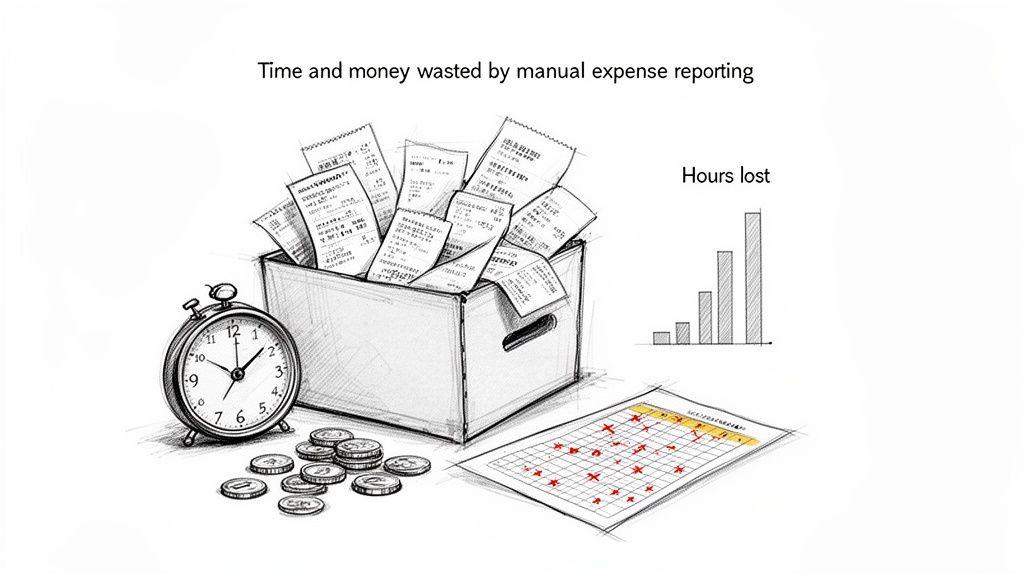
Manual processes are not just slow; they are inherently prone to mistakes. Every report is a minefield of potential errors. From deciphering a smudged thermal receipt to a simple typo during data entry, each mistake triggers a frustrating back-and-forth with the finance team. This is not just administrative work; it is a significant distraction from core business activities.
Quantifying the Financial Drain
The financial impact of manual methods is substantial. Research from Forrester shows that 80% of organisations still rely on manual processes, with each report taking an employee 20 minutes to prepare and another 18 minutes to correct.
This time adds up. The cost to process a single report averages $58, with an additional $52 for every correction. For a small business in Australia, eliminating duplicate claims through automation can save up to $40,000 AUD annually.
This does not include opportunity cost. If you are a consultant or freelancer, every hour spent taping receipts to paper is an hour not billed to a client. That lost time directly reduces your revenue.
For a business consultant, every hour spent on administrative tasks is an hour not billed to a client. Automating expense reports directly converts non-billable admin time back into profitable work. It is a clear and immediate return on investment.
To put the numbers in perspective, here's a side-by-side look at the real costs involved.
Manual vs Automated Expense Reporting: A Cost-Benefit Analysis
| Metric | Manual Process | Automated Process |
|---|---|---|
| Time per Report | 20-30 minutes | 3-5 minutes |
| Correction Time | 18+ minutes | Near-zero |
| Cost per Report | $58 | $7 |
| Error Rate | High (human error) | Low (machine accuracy) |
| Compliance Risk | High (lost receipts, inconsistent data) | Low (digital audit trail, policy enforcement) |
| Employee Morale | Low (tedious, frustrating task) | High (quick, easy process) |
The contrast is stark. Automation does not just cut costs; it builds a more reliable and less frustrating process for everyone involved.
Compliance and Regulatory Headaches
Beyond the direct costs, manual expense tracking presents a serious compliance risk, particularly for those in regulated industries or conducting international business. Maintaining clean, audit-proof records is non-negotiable.
- DACH Region (GoBD): In Germany, Austria, and Switzerland, you are bound by strict GoBD regulations. These rules require tamper-proof digital archives for all financial documents. A shoebox of receipts is not compliant.
- USA (IRS): The IRS has stringent record-keeping requirements for tax deductions. A missing or illegible receipt can lead to a disallowed expense during an audit and potential penalties.
- VAT Deductions: For frequent business travellers in Europe, properly documenting and claiming VAT across different countries is complex. Manual errors lead to missed VAT recovery, leaving money unclaimed. You can see how these expenses fit into your larger financial picture by reading our guide on general and administrative expenses.
Adopting automation is a clear way to automate repetitive tasks, which not only frees up your time but also mitigates these serious risks. The objective is not just convenience—it is about creating a robust, compliant, and efficient financial workflow that supports business growth.
Choosing the Right Expense Automation Tool for Your Needs
Selecting the right software to automate your expense reports is not about finding the tool with the most features. It is about finding a solution that fits how you work. The market includes everything from large enterprise systems to focused apps designed for individuals. Your task is to find one that removes complexity, not adds to it.
For example, large platforms like SAP Concur, Spendesk, or Circula are built for large corporations with complex procurement processes and multiple approval layers. They are powerful but often excessive for a consultant, small business owner, or sales representative who simply needs to capture a receipt and get reimbursed. Their user interfaces can be cumbersome, and the mobile experience often feels secondary.
Big Company Tools vs. Personal Apps: What's the Real Difference?
The primary difference is the intended user. Enterprise systems are designed top-down, focusing on corporate policy, control, and deep ERP integrations. The central finance department is the main customer.
In contrast, tools like Bill.Dock, Expensify, N2F, and Rydoo are built for the individual incurring the expense. They prioritise speed, simplicity, and a mobile-first design. For a consultant moving between client meetings, this means capturing a taxi receipt in seconds, confident that the data is accurate, without needing to log into a corporate portal on a laptop.
Here is a clear example of a mobile-first interface designed for this purpose. This design places the most important actions front and centre, allowing you to scan a receipt or log an expense immediately. This focus on individual efficiency is critical. The right tool should feel like a personal assistant, not another administrative task.
What to Look For: Your Personal Evaluation Checklist
To make an informed decision, evaluate tools against the real challenges you face daily. Focus on practical features that save time and reduce stress.
How accurate is the AI receipt scanning? This is the core function—turning a photo into usable data. Look for platforms transparent about their success rates, such as Bill.Dock's 95%+ accuracy. This is the difference between a quick verification and manually correcting every entry, which defeats the purpose of automation.
Is the mobile app functional and fast? As a busy professional, you capture expenses on the move. The app must be fast, stable, and intuitive. Can you capture a receipt, check its status, and create a report entirely from your phone? Test this during the free trial.
Can you provide access to your assistant or accountant? If you have support managing your finances, secure delegate access is essential. This allows them to handle your expenses without you sharing your password, keeping your financial data secure and under your control.
Does it handle foreign currencies effectively? For anyone travelling internationally, this is non-negotiable. Manually converting currencies is prone to errors. A good tool will automatically detect the currency on the receipt (Bill.Dock supports 150+ currencies) and convert it using current exchange rates.
Is your data secure and compliant? Where is your information stored? If you are based in Europe, you need assurance that the service is GDPR-compliant and that your data resides on EU-based servers (like Bill.Dock's in Frankfurt). For professionals in Germany, Austria, or Switzerland, GoBD-compliant archiving is crucial to ensure your digital records withstand an audit. Researching accounting automation can provide a better understanding of these compliance standards.
The best tool is the one you will actually use. A simple, reliable mobile app that captures a receipt in five seconds is infinitely more valuable than a complex enterprise system that remains unused because it is too cumbersome for daily tasks.
Ultimately, this is a personal decision based on your specific workflow. Do you simply need PDF or Excel exports for your tax advisor? Are you a freelancer looking to digitise your records? To learn more, it is worth understanding the shift to paperless accounting software and its benefits for you.
My advice is to prioritise solutions that offer a trial period. Look for a no-obligation free trial, like Bill.Dock's 30-day trial without a credit card required, so you can test the software in your real-world environment before committing.
A Practical Workflow for Automated Expense Reporting
Let's move from theory to a practical, working system. We will outline how to build a solid workflow that takes you from a crumpled receipt to a complete, audit-ready report. The objective is to eliminate manual data entry and maintain accurate financial records.
The demand for better financial tools is growing. The expense management automation market is projected to reach $12.05 billion by 2029, with a steady 9.2% CAGR. Businesses globally, from the USA to the DACH region, are adopting AI-powered solutions. Modern optical character recognition (OCR) can now process 80-90% of receipts without human intervention, enabling features like DATEV exports in Germany and GoBD-compliant archiving.
Before selecting any software, you must define your own process. This simple flow illustrates the approach.
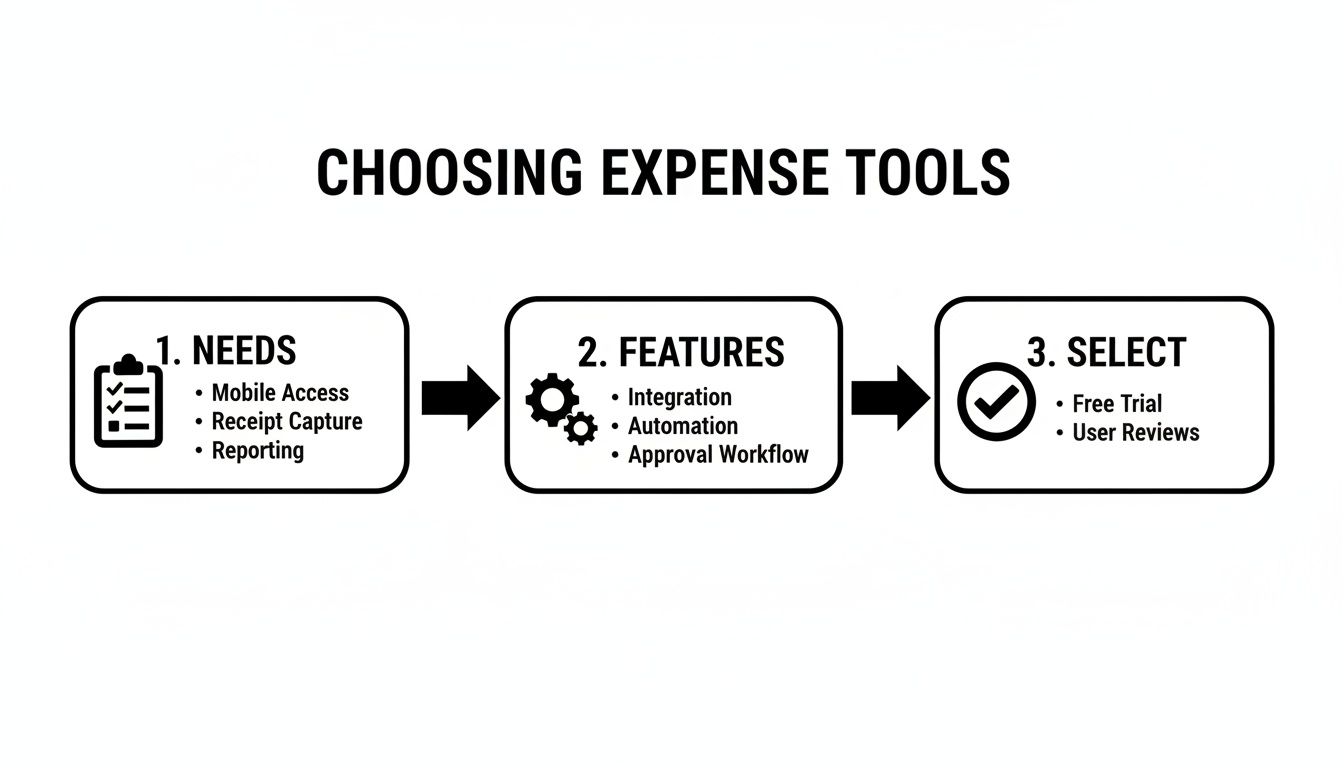
As you can see, it all begins with your specific needs. Get that right, and the rest follows logically.
Nail Down Receipt Capture and Data Extraction
The core of any effective automated system is how it captures information at the source. Your primary goal is to eliminate the "shoebox of receipts" by digitising everything immediately.
Modern tools offer two main methods for this:
- Mobile App Scanning: This is the primary method for anyone on the move. A sales representative having lunch with a client or a consultant taking a taxi can capture a receipt instantly. You take a photo with an app like Bill.Dock, and the AI extracts the merchant, date, total, and currency.
- Email Forwarding: This is ideal for digital receipts and online purchase confirmations. Instead of downloading a PDF to upload it later, you forward the email to a dedicated address provided by your expense tool. The system parses the attachment or email body and creates the expense for you.
Once the receipt is in the system, the AI performs the data extraction. A reliable platform with 95%+ accuracy will correctly identify critical details, including VAT—essential for anyone in Europe needing to claim it back. This is the function that frees you from the tediousness of manual entry.
Here is my rule of thumb: If it is slower to take a photo of the receipt than to put it in your wallet, the system is flawed. People will not use it if it is not immediate and reliable.
Organise Your Spending with Smart Categories and Tags
With the data captured, the next step is organisation. A long, uncategorised list of transactions is not useful. You need structure to understand your spending and simplify tax preparation. This is where custom categories and tags are applied.
Use categories that reflect your business operations. A freelance photographer, for example, would benefit from categories like "Client Shoot: Travel," "Equipment Rental," and "Studio Supplies."
Tags add another layer of detail. They allow you to link expenses to specific projects, clients, or internal codes. A consultant at a firm like McKinsey or BCG can tag every expense to a specific client engagement. When it is time to bill that client or conduct an internal review, generating the report is a one-click process. To delve deeper into this, see our guide on how to properly organize your receipts for maximum efficiency.
Tame Multi-Currency Expenses and Delegate Access
For anyone who travels for work, managing different currencies is a persistent challenge. Manually converting a hotel bill from Japanese Yen or a train ticket in Swiss Francs is prone to error.
A good automation tool resolves this issue. Bill.Dock, for example, supports over 150 currencies. It automatically detects the currency on the receipt and converts it to your home currency using up-to-date exchange rates. It is accurate and saves considerable time.
Finally, an effective system allows you to delegate tasks. Professionals often work with assistants or accountants, and a secure way to grant them access without sharing your password is necessary.
- Consultants at major firms can give their assistants access to review and finalise their reports, ensuring timely submission.
- Small business owners can grant their tax advisor read-only access, simplifying year-end preparation.
This delegate access feature maintains security while offloading administrative work. By focusing on these pillars—capture, organisation, and access—you build a powerful workflow that allows you to concentrate on your primary responsibilities, not on paperwork.
Integrating Automation with Your Existing Financial Tools
An expense automation tool that isolates your data creates another problem. Its real value comes from enabling a seamless flow of information from a receipt scan to your final accounting records, without manual re-entry. The goal is to make your financial data work for you.
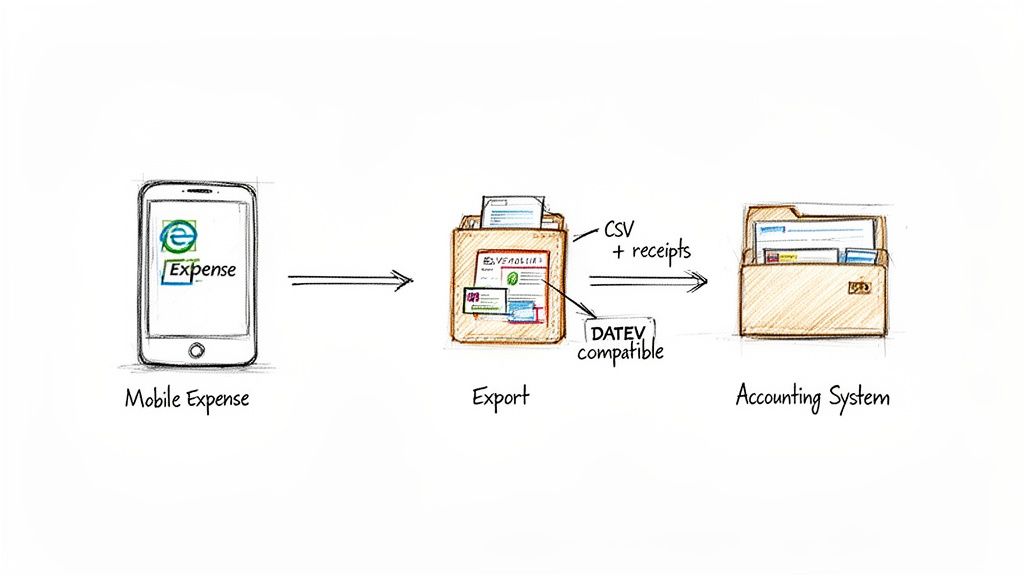
The connection between your expense app and your other financial systems is built on standard export formats. These files act as a universal language, allowing different systems to communicate. Your objective is simple: transfer clean, categorised data into your bookkeeping software, to your tax advisor, or into your ERP efficiently.
Mastering Common Export Formats
Any competent expense management platform provides several export options. Knowing which one to use is key to a smooth workflow.
- Excel/CSV (Comma-Separated Values): These are the standard formats. A CSV file is a simple, plain-text format that nearly every spreadsheet or accounting program can read. It is perfect for importing data directly into systems like QuickBooks, Xero, or Lexware.
- PDF Reports: When you need a polished summary for your records or to share with a client who does not need the raw data, a PDF is the best choice. It creates a clean, non-editable snapshot of expenses for a specific project, trip, or time period.
For example, freelance consultants can save significantly on accounting fees by exporting a year's worth of expenses as a single CSV. Their tax advisor imports it in minutes, avoiding hours of manual data entry.
Handling DACH-Specific Requirements with DATEV
If you operate in Germany, Austria, or Switzerland, a standard CSV export is often insufficient. The financial ecosystem in the DACH region relies on DATEV, a specific data standard used by nearly every tax advisor.
Here, a purpose-built tool is non-negotiable. You need a platform that offers a dedicated DATEV-compatible export. This is not just a rearranged CSV; it is a meticulously structured file designed to meet DATEV’s strict import protocols. Using a tool with this feature, like Bill.Dock, can eliminate hours of back-and-forth with your German Steuerberater (tax advisor), who can then ingest your expense data with a single click.
For anyone working in the DACH region, a DATEV-compatible export is not a 'nice-to-have' feature. It is a fundamental requirement for an efficient workflow. Without it, you are forcing your tax advisor to manually re-key every expense, defeating the purpose of automation.
Generating Audit-Proof, Tax-Ready Reports
Accurate numbers are only half the battle; compliance is the final component. During tax season or an audit, you need not just the transaction data but also the proof—the receipts.
Modern expense tools solve this by bundling everything together. You can generate a comprehensive report package, often as a bundled ZIP file. This single, organised archive should contain two key elements:
- The Data File: The clean CSV or Excel sheet with all your categorised expense data.
- The Scanned Receipts: All the corresponding digital receipt images, perfectly organised.
This bundled export is the gold standard for compliant record-keeping. It provides a complete, self-contained audit trail that satisfies the most stringent requirements from tax authorities like the IRS or the German Finanzamt. It means that when your accountant requests "the receipts," you can deliver one professional, complete package and finalise your automated workflow.
How Do You Know if Your New System is Actually Working?
So you have adopted an automated expense reporting tool. The next question is whether it is delivering on its promise. To determine this, you need to look beyond a general sense of "time saved" and analyse the key performance indicators (KPIs) that impact your productivity and bottom line.
Measuring success is not just about justifying the software subscription. It is about confirming that your new process is faster, more accurate, and more compliant than manual methods. This regular assessment ensures the system is actively contributing to your business.
Key Metrics to Track (Besides Just Saving Time)
Reclaiming hours from data entry is a significant benefit, but it is only part of the story. An effective system improves your entire financial workflow.
Here are the critical metrics to track:
- Error Rate Reduction: Manual entry is prone to typos, incorrect amounts, and miscategorised expenses. Track how many reports your accounting team returns for correction. A high-quality automated system should reduce this number to nearly zero.
- Faster Reimbursement Cycles: This is a major factor in employee morale. Measure the average time from expense submission to reimbursement. A decreasing cycle time indicates the system is working well for everyone.
- Better Policy Compliance: Good software flags out-of-policy spending immediately. Monitor the number of these flags over time. A decrease indicates that the system is successfully enforcing your spending rules without manual oversight.
Using Your Dashboard to Get Deeper Insights
Most expense automation platforms, like Bill.Dock, include reporting dashboards that convert raw data into business intelligence. This is where you can identify spending trends and opportunities for cost savings.
Use these dashboards to ask better questions. For instance, a consultant can track all expenses tied to a specific client project to determine its profitability accurately. A sales manager can monitor travel costs by region to set a more informed budget for the next quarter.
Your goal is to shift from just processing expenses to proactively managing your finances. A good dashboard does not just show you what was spent; it helps you understand why and how you can spend more intelligently in the future.
For busy professionals who delegate, features allowing secure access are essential. Bill.Dock, for example, lets you grant specific, controlled access to a personal assistant or accountant. This enables you to offload administrative work without losing control. Furthermore, with GDPR compliance and data stored on EU servers in Frankfurt, your financial data remains secure. You can learn more about their secure and compliant expense management features on their site.
Don't Set It and Forget It: Review and Refine
Your business evolves, and your expense process should adapt accordingly. I recommend scheduling time each quarter to review the system and the data it produces.
Consider it a tune-up. It is an opportunity to adjust expense categories, update spending policies, or modify approval workflows as your team and projects change. This regular check-in ensures your investment continues to deliver value, turning your automated expense system into a long-term asset.
Your Questions About Expense Automation, Answered
Adopting an automated expense system often raises a few questions. As a busy professional, you need direct answers, not a sales pitch. Let's address the most common queries so you can understand how this works in practice.
Are Digital Receipt Scans Good Enough for a Tax Audit?
Yes, in most jurisdictions. For major economies—including the USA, UK, Canada, Australia, and the EU—a clear digital copy of a receipt is legally acceptable for tax purposes. The primary requirement is that the scan must be legible and stored in a way that prevents tampering.
However, in countries with stricter regulations, such as Germany, you must be more careful. German tax law adheres to GoBD, which requires a certified, tamper-proof digital archive. This is non-negotiable with the Finanzamt. Using a specifically GoBD-compliant tool like Bill.Dock is critical to ensure your digital records are audit-proof.
How Good is the AI at Actually Reading Receipts?
It is highly accurate. Modern OCR (Optical Character Recognition) technology has advanced significantly. The best platforms achieve over 95% accuracy on key details like the vendor, date, total amount, and VAT.
This means the task of manual data entry is largely eliminated. While you may still need to review a badly crumpled or faded receipt, the AI handles the majority of the work. This is where the most significant time savings are realised, and frustrating typos are avoided.
What About Handling Multiple Currencies from International Trips?
This is where automation excels. Anyone who has dealt with a currency conversion app after a long flight knows how tedious and error-prone it can be. A proper expense tool manages this for you.
For example, if you are in Tokyo and pay for a taxi in Japanese Yen, you simply take a photo of the receipt. A tool like Bill.Dock, which supports over 150 currencies, instantly identifies the currency, applies the correct exchange rate for that day, and logs the expense in your company’s base currency—whether that is Euros, Pounds, or US Dollars. No more guesswork or manual calculations.
My Company Forces Us to Use SAP Concur. Can I Use Something Else?
Yes, and many professionals do. This "two-tool" approach is common in large consulting firms and enterprises. While the final report must be submitted through the official corporate system like SAP Concur or Spendesk, you can use a faster, more user-friendly tool for initial capture.
Consider this workflow: A consultant at a firm like BCG or Deloitte uses a simple app like Bill.Dock to capture a dinner receipt at the table. The data is instantly extracted and categorised. Later, they can use this perfectly organised information to complete the submission in the corporate system quickly. It is a hybrid approach that provides daily convenience while maintaining compliance.
Ready to stop wasting hours on expense reports? Bill.Dock offers a 30-day free trial with no credit card required. See for yourself how 95%+ accurate receipt scanning, multi-currency support, and compliant archiving can improve your workflow.